React Native and Expo
Embed Jupid in a React Native or Expo app with a top-level WebView.
@jupid/react-native renders Jupid in a top-level WebView. It uses the same
partner identity mapping and Jupid cookie session as the browser SDK, without
nested iframe storage constraints.
The package is currently source-built in the Jupid repository and is not yet published to a public package registry. Coordinate package access and staging configuration with Jupid before integrating it in a partner repository.
Prerequisites
Jupid provides the partner ID and exact HTTPS app origin. The partner provides an authenticated backend endpoint. The native app sends its signed-in user's partner access token to that endpoint, which returns a short-lived Jupid JWT:
{ "token": "partner-signed-jwt" }The signing secret stays on that backend. Neither the secret nor an access or
Jupid token belongs in an EXPO_PUBLIC_ variable or JavaScript bundle. See
Authentication for the token claims.
Expo includes react-native-webview in Expo Go. Install the version compatible
with the app's Expo SDK:
npx expo install react-native-webviewSee Expo's WebView documentation for its current bundled version.
Minimal Expo app
The repository integration app is apps/expo-embed. It reads these public
values:
EXPO_PUBLIC_JUPID_APP_URL=https://jupid-staging-app.example.com
EXPO_PUBLIC_JUPID_PARTNER_ID=your-partner-id
EXPO_PUBLIC_JUPID_TOKEN_URL=https://partner.example.com/api/jupid/embed-token
The token endpoint must authenticate the request using the partner app's normal session or access token.
import { JupidEmbed } from "@jupid/react-native"
import { type ReactNode, useState } from "react"
import { Button, StyleSheet, Text, TextInput, View } from "react-native"

const appUrl = process.env.EXPO_PUBLIC_JUPID_APP_URL
const partnerId = process.env.EXPO_PUBLIC_JUPID_PARTNER_ID
const tokenUrl = process.env.EXPO_PUBLIC_JUPID_TOKEN_URL

if (!appUrl) {
  throw new Error("Missing EXPO_PUBLIC_JUPID_APP_URL")
}
if (!partnerId) {
  throw new Error("Missing EXPO_PUBLIC_JUPID_PARTNER_ID")
}
if (!tokenUrl) {
  throw new Error("Missing EXPO_PUBLIC_JUPID_TOKEN_URL")
}

export default function App() {
  const [accessToken, setAccessToken] = useState("")
  const [credential, setCredential] = useState("")
  const [error, setError] = useState("")
  let errorView: ReactNode
  let content: ReactNode
  if (error) {
    errorView = <Text style={styles.error}>{error}</Text>
  }
  if (credential) {
    content = (
      <JupidEmbed
        appUrl={appUrl}
        partnerId={partnerId}
        getToken={async () => {
          const response = await fetch(tokenUrl, {
            headers: { Authorization: `Bearer ${credential}` },
          })
          if (!response.ok) {
            throw new Error(`Token endpoint returned HTTP ${response.status}`)
          }
          const body = (await response.json()) as { token: string }
          return body.token
        }}
        initialPath="/"
        shell="topbar"
        chat="disabled"
        onError={(nextError) => setError(nextError.message)}
      />
    )
  } else {
    content = (
      <View style={styles.connect}>
        <Text style={styles.label}>Host access credential</Text>
        <TextInput
          value={accessToken}
          onChangeText={setAccessToken}
          placeholder="Bearer access token"
          secureTextEntry
          autoCapitalize="none"
          autoCorrect={false}
          style={styles.input}
        />
        <Button
          title="Connect Jupid"
          onPress={() => {
            if (!accessToken) {
              setError("Enter a host access credential")
              return
            }
            setError("")
            setCredential(accessToken)
            setAccessToken("")
          }}
        />
      </View>
    )
  }

  return (
    <View style={styles.container}>
      {errorView}
      {content}
    </View>
  )
}

const styles = StyleSheet.create({
  container: {
    flex: 1,
  },
  error: {
    backgroundColor: "#fee2e2",
    color: "#991b1b",
    padding: 12,
  },
  connect: {
    gap: 12,
    justifyContent: "center",
    flex: 1,
    padding: 24,
  },
  label: {
    fontSize: 16,
    fontWeight: "600",
  },
  input: {
    borderColor: "#9ca3af",
    borderRadius: 8,
    borderWidth: 1,
    padding: 12,
  },
})
The three EXPO_PUBLIC_ values are non-secret configuration. The test app keeps
the interactively entered host access credential in memory, sends it only to
the partner token endpoint as a bearer token, and gives Jupid only the returned
short-lived JWT.
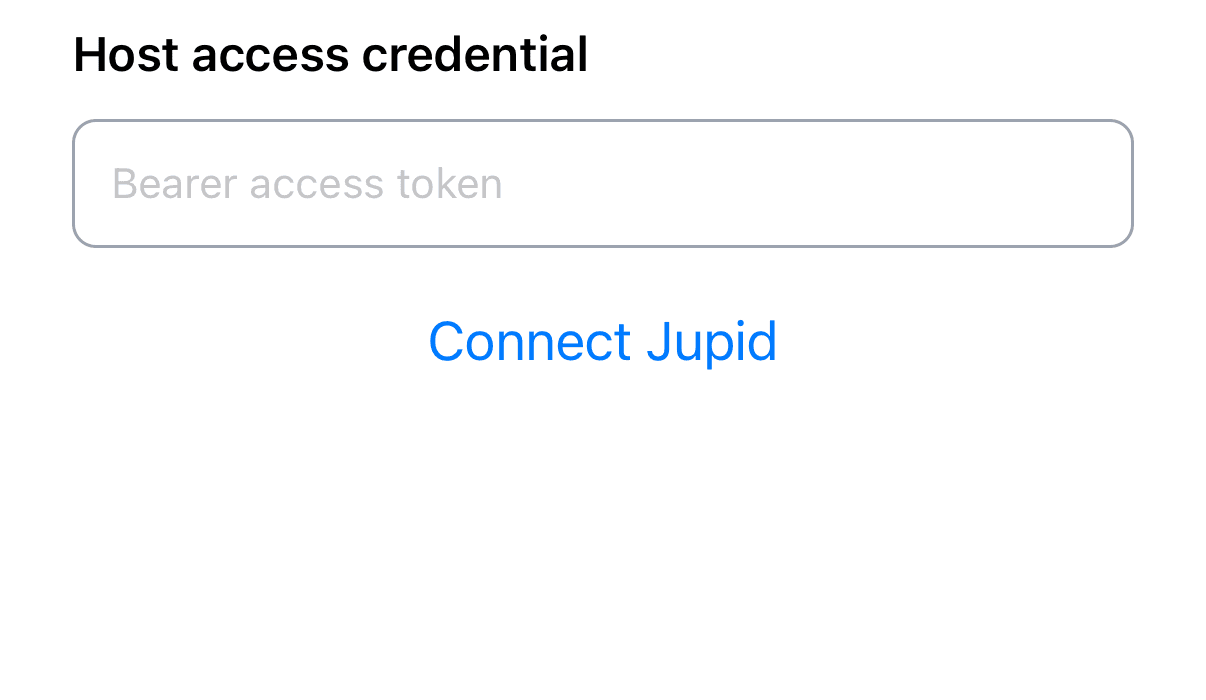
Host credential entry before the WebView mounts.
Run the integration test
From the repository root, provide the three public values above and start the app:
bun run --filter @jupid/expo-embed startOpen it in Expo Go for the basic smoke test, or use a development build for release-equivalent links and permissions. Enter an access credential issued by the partner host and select Connect Jupid. Verify:
- the partner backend authenticates the bearer credential and returns
{ "token": "..." }; - a new partner user reaches Jupid onboarding and a returning user reaches the
requested
initialPath; - an invalid host credential surfaces the partner endpoint error;
- an invalid or expired Jupid JWT causes one new token request, while a second
rejected JWT reaches
onError; - external links leave the WebView; and
- reloading the test app with another host user creates a fresh WebView and mapping.
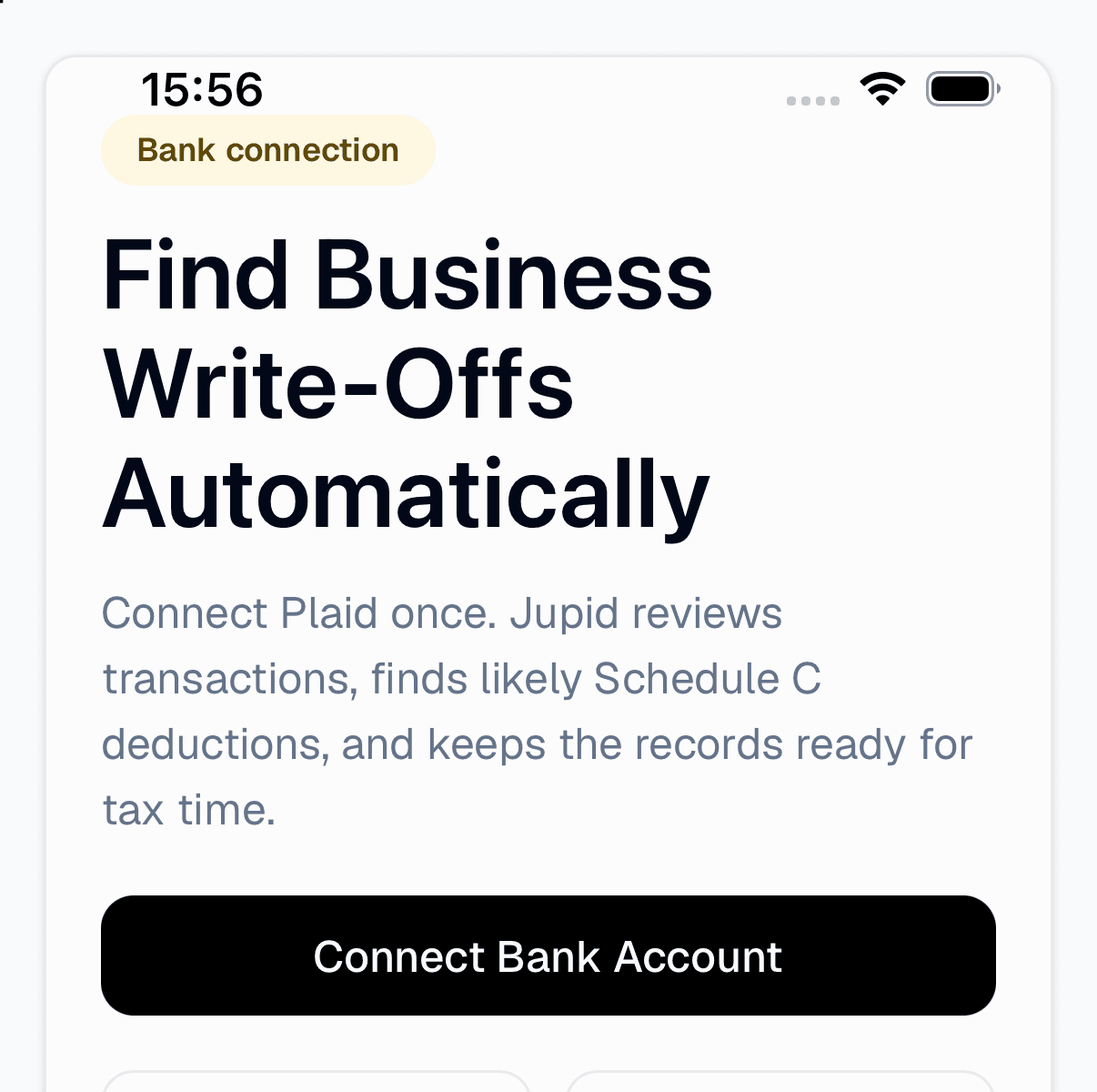
First-run Jupid onboarding inside the connected WebView.
Optional props are initialPath, shell, and chat. initialPath is a
root-relative Jupid path without control characters. The shell values are
topbar and sidebar; chat is enabled or disabled.
Authentication lifecycle
- The SDK loads
<appUrl>/embed/<partnerId>as the top-level WebView document with the non-secret initial headerx-jupid-embed: native. - Jupid selects the native bootstrap from that request header and sends
the literal string
jupid:readyto the SDK. - The SDK calls
getTokenand sends JSONjupid:tokenwith the token and navigation options to the trusted bootstrap document. - The bootstrap POSTs
/api/embed/sessionwith the same native header. Jupid requires the requestOriginto equal its own origin, verifies the JWT, creates the normal cookie session, and redirects within the WebView. - Any JWT verification failure returns HTTP 401. The bootstrap sends the
literal string
jupid:auth-failed, the SDK callsgetTokenonce more, and a second failure is reported throughonError.
The current JWT is not a one-time ticket. A valid token can be replayed until
its exp; Jupid requires jti but does not store or consume it. Keep the
expiration short, do not persist tokens, and fetch them only for a mount or the
single refresh.
The native header selects transport; it does not authenticate the user. The
bearer JWT passes through the trusted Jupid bootstrap document's JavaScript
before the same-origin session request. Keep appUrl fixed to the Jupid origin;
the native bridge is not a general secret channel for arbitrary pages.
When the partner user changes, unmount JupidEmbed and mount a new instance
with a fresh token. Do not reuse a WebView across partner users.
Platform boundaries
- Expo Go and development builds. Expo Go supports this integration because
it includes
react-native-webview. Use an Expo development build to test the partner app's own URL schemes, universal links, permissions, and release configuration. - Cookies. Jupid is top-level in the WebView, so its session cookie is first-party there. Treat the WebView and system browser as separate cookie stores; do not depend on a Safari or Chrome login being shared with Jupid. The platform stores are managed through WKWebsiteDataStore and Android's CookieManager.
- Navigation and popups. The SDK keeps only the exact Jupid HTTPS origin in
the WebView and sends external URLs to
Linking.openURL. New-window behavior differs by platform; React Native WebView exposesonOpenWindowandonShouldStartLoadWithRequestfor explicit routing. - OAuth and bank providers. Open provider authorization in the system
browser and return through an app or universal link. The minimal SDK does not
add that callback bridge. Expo documents the system-browser and return-link
pieces in
expo-web-browserand Linking. - Files and permissions. File inputs, downloads, camera, microphone, and location need platform permissions and host handling beyond the minimal SDK. Review React Native WebView's file upload and download guidance for each enabled Jupid surface.
- Renderer lifecycle. iOS or Android can terminate the WebView content
process. Remount with a fresh token rather than assuming in-memory page state
survived. The platform callbacks are
onContentProcessDidTerminateandonRenderProcessGone. - Transport security. Production
appUrlmust be HTTPS. Apple App Transport Security and Android cleartext policy can reject HTTP origins; see the official Apple and Android guidance.
Test new and returning users, 401 refresh, external links, provider flows, process recovery, and user switching on physical iOS and Android devices before launch.