Jupid Embed
Partner integration docs for embedding Jupid in another product.
Jupid Embed is for banks, financial institutions, fintechs, and third-party tools that want to offer Jupid inside their own product experience.
This is a partner integration surface, not a self-serve advanced-user setup. Jupid creates partner configuration, browser origin policy, staging access, production access, and commercial terms before launch.
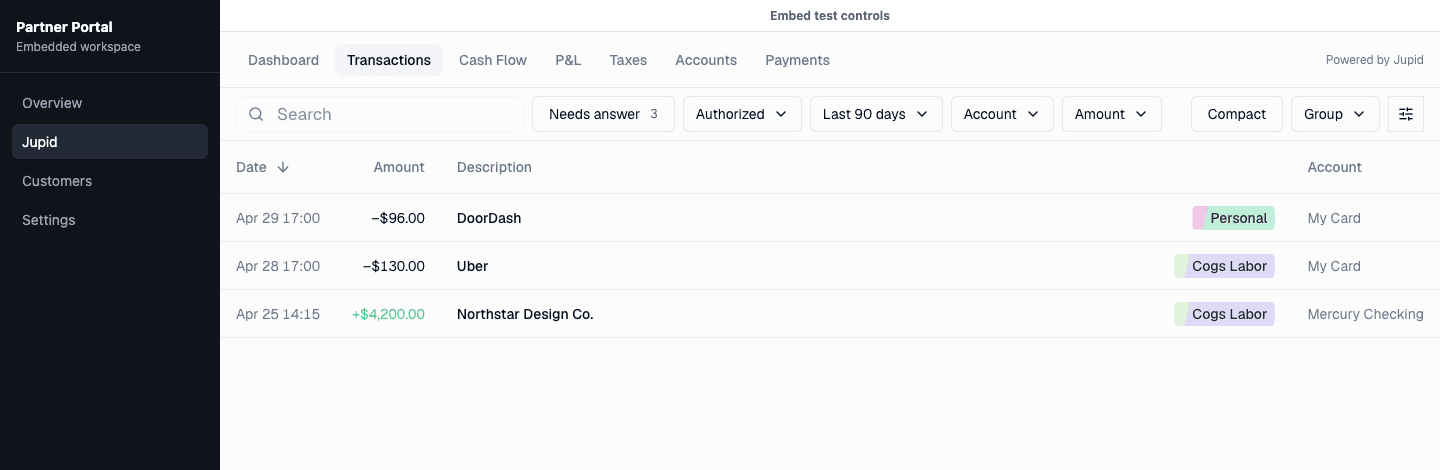
What the embed does
Jupid opens a full financial workspace inside the partner product. The partner keeps the outer relationship, navigation, and authenticated entry point. Jupid handles accounts, financial data, categorization, reports, billing-aware flows, and the workspace UI inside an iframe or top-level WebView.
The primary integration has two parts:
- a host SDK for a browser iframe or React Native WebView;
- a partner-owned server endpoint that creates short-lived signed tokens for authenticated partner users.
Some integrations also use server-to-server webhooks for partner events such as account-list changes.
Jupid uses the token to map each partner user to a Jupid user, create a session, and render the embedded dashboard in an iframe or top-level WebView.
What partners build
Partners build one authenticated server endpoint:
GET /api/jupid/embed-tokenThat endpoint signs a token with the shared secret provided by Jupid. The host SDK calls the endpoint while mounting Jupid. A mobile app authenticates that request with its user's partner access token.
What Jupid configures
Jupid provides:
- the partner ID;
- separate staging and production token signing secrets;
- the staging and production Jupid app URLs;
- webhook URLs and webhook secrets, when the partner integration uses server-to-server events;
- the Jupid-side usage-based free limit for the pilot;
- the allowed local, staging, and production browser origins;
- iframe ancestor policy for those origins;
- default shell mode, chat visibility, and partner branding;
- the production app URL:
https://app.jupid.com.
Start with Embed quickstart for web or the React Native and Expo guide for mobile. Then review authentication, webhooks, and testing and launch.
Contact slava@jupid.com to request partner access.